

The limit appears. Your thumb dismisses it. Apparently the two of them have an arrangement.
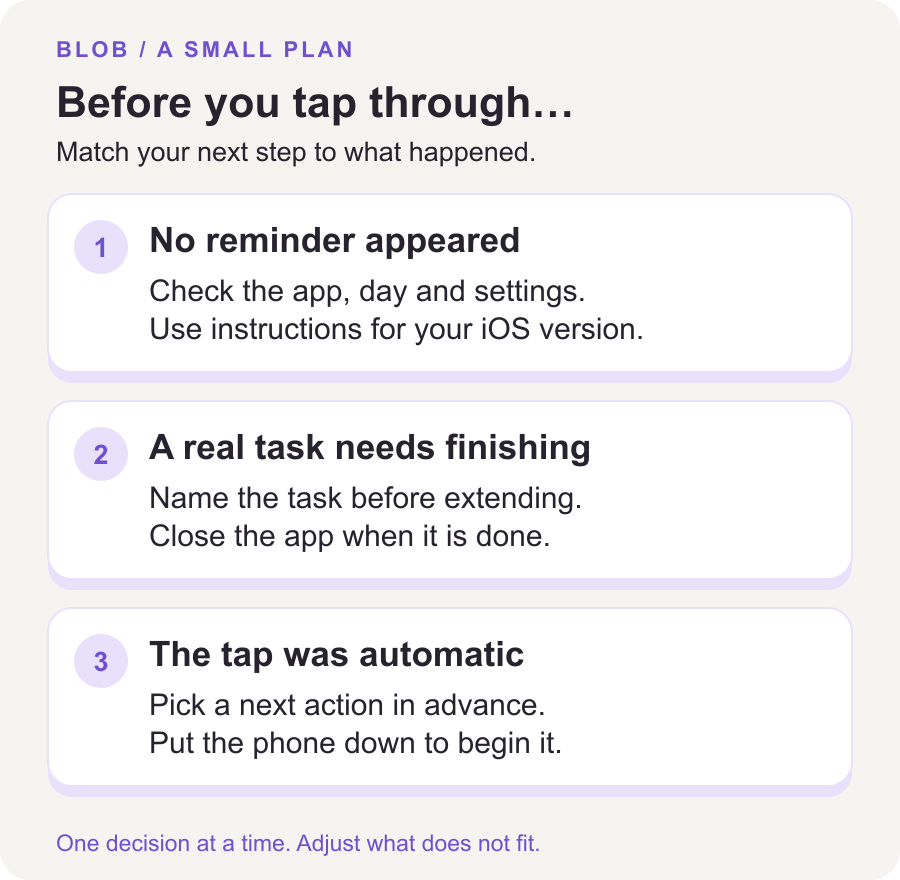
If you keep ignoring Screen Time limits, look at the last time you overrode one before making the number smaller. Did the alert fail to appear? Did it interrupt something you needed to finish? Or did you tap through before deciding whether you wanted to keep scrolling? Those are three different problems.
Start with the one that actually happened. A stricter limit can be useful, but it cannot decide what you should do when the limit arrives.
First, separate a settings problem from a decision problem
If the reminder never appears, check which apps and days your rule covers. If it appears and you knowingly extend it, the reminder has reached you. That second situation needs a plan for the interruption as well as a settings check.
Apple's iOS 26 guide says limits can be ignored by default. It distinguishes daily App Limits from scheduled Downtime, and explains how a Screen Time passcode enables Block at Downtime. That setting concerns scheduled downtime; it is not the same thing as choosing a daily app allowance.
Check the version selector in Apple's instructions. Its iOS 27 guide uses Screen Time Schedules and Time Allowances, with software requirements across your Apple devices. If your settings labels differ from a tutorial, use the instructions for your version. Keep essential apps and contacts available.
For the broader setup choices, read our iPhone app-blocking guide. The rest of this article is about a limit you see and dismiss on your own phone.
Inspect one override, without holding a trial
Think about the most recent example you remember clearly. Write down the app, the situation, and what you intended to do next. “Instagram, after lunch, checking a message from my sister” is more useful than “I have no self-control.” The first gives you something to change. The second mostly makes the afternoon unpleasant.
You might find one of these patterns:
- The allowance conflicts with a real task. You use the same app for messages and a feed, so blocking everything also interrupts a conversation.
- The rule arrives at the wrong time. You spend the allowance earlier, then remove the restriction when you want some planned leisure later.
- The dismissal happens automatically. You barely read the prompt and carry on.
- There is nothing ready to do afterward. You close the app, sit with the phone in your hand, and reopen it.
These are possibilities to investigate, not a diagnosis. You may find a different reason. Keep the description ordinary and specific.
Give necessary access a finish line
Suppose the alert interrupts a useful message. Before extending access, name the task: “Send the address, then close the app.” If your setup offers a short extension, choose one that fits the task. After sending the address, leave the app instead of treating the rest of the extension as time you ought to use.
For recurring needs, change the rule outside the moment of temptation. You could move a regular conversation to a planned time, adjust that day's allowance, or agree on another communication channel if that works for everyone involved. There is no need to turn ordinary contact into an obstacle course.
Write a leisure exception just as clearly: “I want to look at videos after dinner, and I will stop when my chosen session ends.” Enjoyment is a legitimate use of a phone. An exception becomes difficult to evaluate when it has no intended ending.
Make the next action visible before the alert
If you tap through automatically, prepare one response in advance. For example: “When the reminder appears during lunch, I will put the phone on the side table and finish eating.” Choose a place within reach if you need to remain available for important calls.
Try writing that sentence where you will see it before opening the app. It gives the alert a job beyond announcing that time has passed. A reminder without a next action can become a very small administrative task.
You can also remove one unnecessary entrance: a nonessential notification, a prominent Home Screen shortcut, or the habit of leaving the feed open when you lock the phone. Pick one change so you can tell whether it helps.
When the problem is opening a particular feed repeatedly, our TikTok autopilot guide goes into that earlier moment.
Try a three-entry check, not a lifetime promise
For the next three times you encounter the limit, make a brief note after you put the phone down:
- What did I need or want from the app?
- Did I extend the limit, stop, or move to another app?
- Did I finish at the point I intended?
This is a small editorial exercise, not a validated treatment or a claim that three attempts change a habit. Its purpose is to make the next adjustment less random.
If all three overrides were for useful messages, change how the rule handles those messages. If all three became open-ended scrolling, choose a clearer stopping point and put the next activity within reach. If you simply moved to another feed, include that substitution in your review. Your phone's weekly total may look tidier while the same unwanted routine remains.
A good outcome might be finishing lunch without a feed, even if your total screen time barely changes. Measure the time or activity you wanted to protect. For a wider starting point, use our seven-day screen-time reset.
Would another app blocker help?
It may be worth trying one if its interruption fits the problem you found. Compare what happens before opening an app, when an allowance ends, and when you need an exception. Our Screen Time and app-blocker comparison explains the different roles.
Blob puts a math problem before selected distracting apps open. You can solve it to continue or leave the app closed. That may suit someone who wants a more deliberate opening moment. It does not make a phone impossible to use, and it does not guarantee less screen time. There is no need to replace a tool that already works for you.
Common questions
Should I set a much lower limit tomorrow?
Only if it fits the use you want to keep. First find out why you removed today's rule. A smaller number leaves that reason unresolved.
Should somebody else control my passcode?
That is a separate choice about control of your device. You do not need it for the exercise above. Preserve access to essential services and account recovery; do not share account passwords or use an arrangement that feels coercive.
Does overriding a limit mean I am addicted?
It does not establish a diagnosis. If your phone use is causing significant distress or interfering with daily life, a qualified health professional can help you assess what is happening.
Sources and editorial notes
By Blob, the app's publisher. Device references checked October 27, 2026: Apple's iOS 26 schedules and limits and current Screen Time guide and version selector. The examples are illustrative, not customer results. Questions in a NoSurf discussion about limits informed the topic; anecdotes and product promotions in its replies are not evidence of effectiveness.